SimBuddy Get SimBuddy

Anywhere, or on the move.

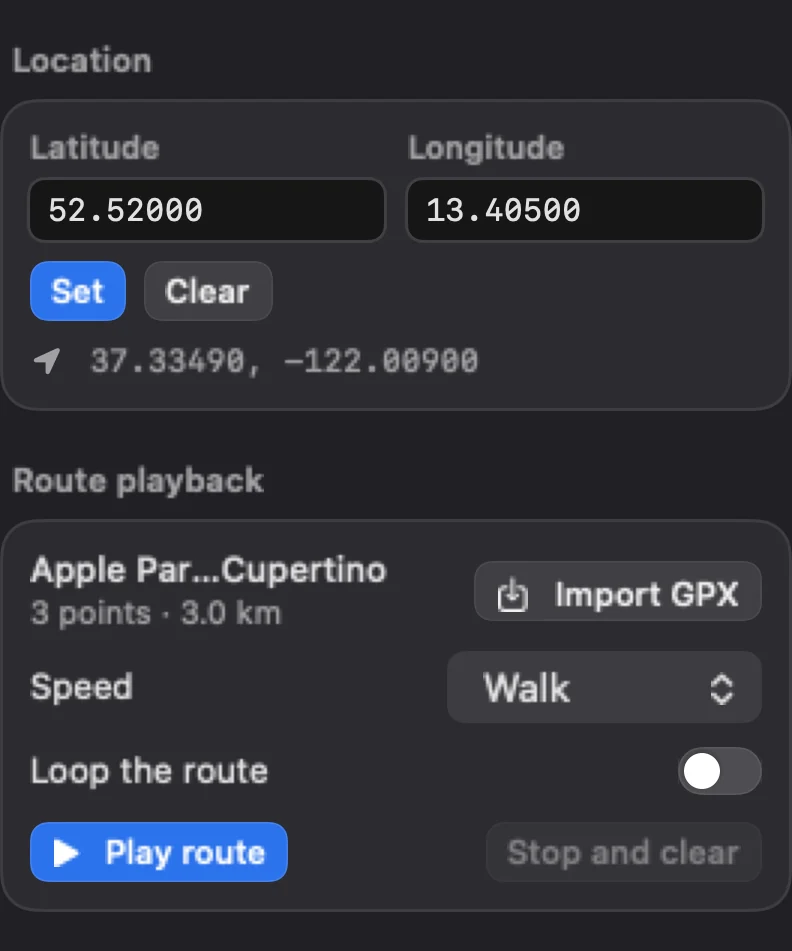
Set the device’s location to a coordinate, or import a GPX file and play it as a moving location at walking, running, cycling, city or freeway speed. Clear puts the real location back.

Free: any coordinate, with no limit, and 3 route playbacks a day.Pro: routes without a daily limit.

SimBuddy’s Location workspace: Latitude and Longitude with Set and Clear, and a route of 3 points and 3.0 km loaded, at Walk, with Play route
The Location workspace.

A route at a real pace.

Import GPX loads a track, a route or Xcode’s own waypoint file, and Play route moves the device along it. Pause, resume, or Stop and clear.

A GPX file can hold several disconnected tracks; Segment picks one. Loop the route starts again from the first point instead of stopping at the end.

  • Walk, Run, Cycle, City drive and Freeway
  • The progress, and how long the route takes at that speed
  • Home lists the location while it is set, and Reset all clears it

Routes your agent can play.

The coordinate and the route have commands. The App Store copy reads GPX files from Downloads.

$ simbuddy location set 52.52 13.405

A coordinate, set.

$ simbuddy location route load ~/Downloads/commute.gpx

A GPX file, loaded.

$ simbuddy location route play --speed city-drive --loop

Played at city speed, over and over.

$ simbuddy location clear

The real location back.